
How Sound Renew works
Every treatment is a short, guided sequence. You start on the body, move to the matching ear point, and the app keeps time for each step.
What you need
No special hardware.
- Headphones or a can speaker
- For the sore area of the body. Wired or wireless, or a small speaker such as a can speaker.
- A headphone bud
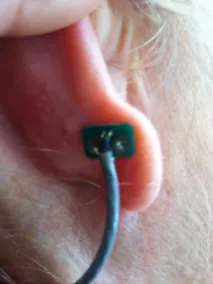
- For the ear point. A single earbud lets you place the tip exactly on the marked spot.
- A quiet few minutes
- Each step has its own timer, so you can settle in and let the app tell you when to move on.
Directions for use: people
These photos are from the Hip treatment. Every treatment in the app shows its own photos, and you can tap any photo to enlarge it.
-

Figure 1. Headphones or a can speaker on the sore area. Treat the painful area
Place headphones or a can speaker on the painful area for about 4 to 10 minutes. This step applies sound and vibration directly to the area that hurts.
-

Figure 2. The blue mark: the front of the ear. Treat the related ear point
Place the headphone bud on the blue mark for about 2 to 4 minutes. Treat the ear on the same side as the pain: the right ear for pain on the right side of the body.
-

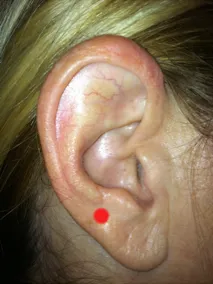
Figure 3. The red mark: the back of the ear. Treat the back of the ear
Treat the area directly behind the red mark. The guide calls the back of the ear very important because it relaxes muscles.
No pain involved? For conditions without pain, such as anxiety, skip the body step and treat both ears for about 2 to 4 minutes.
Reading the photos
Blue mark, red mark.
The ear photos in the app carry two colored marks so you always know where to place the tip.
- Blue mark: place the tip on the front of the ear.
- Red mark: treat the back of the ear, directly behind it.
The back of the ear is easy to find with a simple pinch: pinch the red area between your thumb and index finger, and the treatment area is under your thumb.
Dogs and horses
The same idea, in simpler steps.
Dogs and horses follow the same logic: treat the painful area, then the matching ear point on the same side, then the top of the ear to relax muscles. A speaker on the body is often easier than headphones.
- Painful area
- A phone speaker, Bluetooth speaker or can speaker on the sore spot for 5 to 10 minutes.
- Ear point
- A headphone bud on the corresponding ear reflex point for 4 to 6 minutes, on the same side as the pain.
- Top of the ear
- Treat the top of the ear point opposite the one you just treated for 4 to 6 minutes, to relax muscles.

What the app does for you
- A timer for every step
- Each step counts its own time. Turn on Continuous treatment in Settings and a step plays until you press Stop.
- The frequency, shown
- Every step displays the frequency it is playing in hertz, alongside the time per step.
- Tap to zoom
- Open any photo full size to see exactly where the speaker or bud belongs.
- See how
- Many steps have a See how photo showing the bud in place on a real ear.
- A built-in guide
- The Guide covers how to treat, the back of the ear, continuous treatment and troubleshooting, for people, dogs and horses.
- Comfortable volume
- Keep the volume comfortable, especially at the ear. If you cannot hear the sound at all, turn the device volume up.
Try it free, then choose what you need.
3 human treatments, one for dogs and one for horses are free. Sound Renew is available for iPhone and Android.